


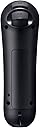
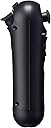


Playstation Move Navigation Controller
Product ID: 182007
🎮9 responsive buttons for precise control
📡Wireless freedom for untethered gameplay
🔋Rechargeable battery with USB auto-pairing
🎯 Elevate your PS3 Move experience—navigate like a pro, game like a legend!
The PlayStation Move Navigation Controller is a wireless, rechargeable gamepad designed exclusively for PS3. Featuring 9 buttons, an analog joystick, and vibration feedback, it pairs seamlessly with the Move motion controller to deliver precise, ergonomic left-hand navigation in compatible games. Its USB charging and auto-pairing system ensures hassle-free setup, making it an essential accessory for serious Move gamers seeking next-level control and immersion.
| ASIN | B002I0K6X6 |
| Additional Features | Wireless Controller |
| Best Sellers Rank | #31,399 in Video Games ( See Top 100 in Video Games ) #96 in PlayStation 3 Controllers |
| Brand Name | PlayStation |
| Button Quantity | 9 |
| Color | Black |
| Compatible Devices | Playstation 3 |
| Connectivity Technology | USB, wireless |
| Controller Type | Gamepad |
| Customer Reviews | 4.6 4.6 out of 5 stars (1,259) |
| Global Trade Identification Number | 00711719990253, 20711719990257 |
| Hardware Platform | Playstation 3 |
| Item Dimensions | 7.5 x 5.3 x 0.6 inches |
| Item Weight | 0.26 Pounds |
| Manufacturer | Sony Computer Entertainment |
| Model Name | 98059 |
| Package Quantity | 1 |
| Power Source | Battery Powered |
| UPC | 711719990253 711719805908 763615787208 778888436975 115971251686 |
L**A
Very Useful for Move Gaming
The PS3 Move Navigation Controller may look like a Wii's nunchuck, but it serves a very different purpose. Where the nunchuck has motion sensing, the PS3 Move Navigation Controller is solely for button pushing. This small, easy to hold device lets you use your left hand for button related tasks - using the joystick for moving around a landscape, using the standard X and O buttons for performing actions. So for example if you are in a sword game you can have the motion-sensitive wand in your right hand, swinging your sword, while using your navigator in your left hand to walk across the field of battle and seek out your next opponent. You might ask, if all this controller does is let you use a joystick and a few buttons, why even buy it? Why not just use a normal controller in the left hand? Certainly you can do that - but the normal controller is set up for two handed use. Many people find it challenging to hold that controller just with the left hand in a way that easily gets them access to the joystick and the two buttons. With this navigation controller setup, it clearly is all arranged for one handed use. If you want to play a game that requires both hands to be motion sensitive - for example a boxing game where you punch with your left hand and also punch with your right hand - this is NOT the controller you want. For that type of activity you'll want two wand controllers, one for each hand. That means that for a typical player on a PS3 move system you need two wand controllers PLUS one navigation controller. You wouldn't use all three at the same time, but some games will have you using the two wand controllers and other games will have you use the wand in one hand and the navigation controller in the other. You can see where this is going. If you have two gamers in the household who want to play head to head games, you now need FOUR wand controllers plus two navigation controllers to have them covered. It's time to give your PS3 system its own shelf, to handle all these accessories! In any case the nav controller works well, is very useful for games, and I highly recommend it for any Move gamers. We purchased our controller from Amazon with our own funds.
C**U
Robin to Motion Controller's Batman
Holy PS3 accessories :) The Navigation Controller is Motion Controller's (aka 'the Move') natural complement. It is not a 'must buy' at this time but it helps to have one for certain games where it's meant to be operated with 'the other' hand. If you don't have one, you can get away with a DualShock or a Sixaxis. To make an informed decision on whether a purchase is warranted at this time (or ever) it's important to be aware of the following: - At the time I am writing this, not too many 'Move' games need the Nav. Probably because, one week after Move's official launch there aren't too many Move games out there but that will change - I just ordered Heavy Rain which does use the Nav and I've had Little Big Planet 2 on order for quite a while. - There is nothing that that Nav can do that your DualShock or Sixaxis can't. In fact, the Nav Controller is nothing but the left side of the DualShock 3 plus the X and O buttons (PS button too) and minus rumble and motion sensitivity. You can, therefore, use your DualShock instead of the Nav on games that may require it. These being said, the Nav is a well-designed, quality built accessory that does what it's supposed to do very well. It may not look like much but holding and using it feels 'natural' and all the familiar controls are easy to reach even though it may take a little practice to get used to the unexpected but necessary O and X. And, of course, the Nav does NOT come with a wrist strap because it does not need one. The Nav Controller will not be used to hack and slash or punch or parry. As its name implies, its main use is for 'navigation', meaning mostly the analog joystick, but the L2/L3 triggers and the D-pad are also there when needed - in Aragorn's Quest you use the L2 to raise the shield. Rating the Nav controller for what it is and what it does, I find no faults with it whatsoever. I appreciate its exceptional design, quality and its apparent durability. Some of the early Move games that take good advantage of the Nav Controller include Heavy Rain, MAG, Aragorn's Quest at the time of this review, Little Big Planet 2 coming up in a couple of months, many in between, I hope. To the extent that the Move proves itself a success with game developers, the Navigation Controller will find its uses and its users. I believe it to be so because holding the DualShock in one hand while swinging the Motion Controller with the other is not a good way to play a game.
C**.
100% A1
Excellent seller, top quality product A1, I recommend it 100%
M**K
Perfect replacement for movement to non WASD people
I purchased this PS3 move controller to play games on my PC while avoiding WASD movement. I'm a life time controller, console player and WASD is just not natural to me. Since most of my gaming is still on controller and I work full-time, I still want to be competitive when I do play on PC and I was heavily hindered by my movement on the keyboard. I know it would just be a matter of time but I really like the sensitivity you are allowed when light touches equal a walk as opposed to the 0-100 you get when pressing keyboard keys to move. There are more than enough buttons at the reach of the hand to make this a perfect left hand replacement to a keyboard. My game has improved ten fold since purchasing for this purpose.
A**C
Very useful for shooting games
I tried to refrain from getting this to go along with my Move Motion Controller, as it isn't necessary. But playing the shooter games in modes requiring to move, using wireless controller on one hand while holding gun on the other just doesn't seem to be as immersive as I can be. So I got this along with the Sony PS3 Sharp Shooter that holds both the Motion and this Navigation Controller, and it feels more realistic. The games I tested with includes Time Crisis Razing Storm and KillZone 3, both in campaign/story mode. First time pairing for me require USB connection to console. Subsequent pairings do not require (I have external third party charging dock). It only has L1 and L2. No L3 or R buttons but I can understand that. There is no select/start buttons also and I think this is an inconvenience for me. Yes they can be found on the Motion Controller, but would be nice to have on this as well so I don't have to take my hand off it and find the buttons else where to interrupt the game. I have not tried other Move games that can benefit from Navigation Controller, but I highly recommend it for shooting games requiring controlling the movement.
P**R
Very cool device!
Now first I have to say I do not have a ps3 but this controller is really well made and comfortable. Now to the reason why I bought it, I wanted to use it for pc gaming. After initial trouble for finding drivers I found "Better DS3" which is an amazing program. DO NOT USE MOTIONINJOY!! I have heard it being virus containing and it is an awful program to use, its annoying, it resets every start up, and you have to be connected to the internet, though I did see a mod to make it local but still Dont trust it. Basically I use it as an emulated 360 controller and it works great!
G**G
Accurate and Fun
If your a hardcore gamer this item is well useless. However if you'd like to entertain a group, or children with fun and active games- Then this will be a nice product to add to the arsenal. The games that are compatible with the move are quite easy and enjoyable for the audience. The Playstation Move is more precise and finicky then the Wii. For instance when you bowl you can cheat a bit in the Wii with your positioning, in the Playstation Move it will laugh at you and show you the fault. Which adds a nice bit of realism. Nice product- not my style or cup of tea but the hours of entertainment from the kids and wife made it a worthwhile purchase.
S**Y
Great quality but adds no value to the game play.
Bought this but do not use it. Only used it when I got it to test it. But then it was not something I really needed. House of the dead and other shooting gallery type of games are good for this and little big planet. Five stars because there is nothing wrong with it and works as expected. So if you like this kind of device it can be great but I bought it just to have it.
I**T
Super Zustand
Alles Top bin sehr zufrieden Danke
V**T
Manette de navigation en complément de la manete de détection
Cette manette est un complément en plus de celle de détection. Elle correspondant au pad gauche de la manette standard. Elle se tient en main comme celle de détection, évitant de devoir manipuler la manette dans certain cas. Elle n'est pas indispensable
S**D
Og product.
It looks like it's imported from China or something but even the PS4s are made in China. It's an original product and it works well. Don't expect warranty though.
L**O
Works great with the PC! *requires third-party software/drivers*
I have a Ps3 but I purchased the Navigation controller for an entirely different reason. I use the Navi controller to control my tablet-PC when I use Photoshop/Clip Studio for painting/sketching. It may not have as many buttons as PC gaming keypads but it's shape and wireless feature makes it worth it. With just the Navi controller and a stylus, I can do everything but typing. When used with Xpadder (a keyboard/mouse simulator for game controllers) you can increase the number of actions per button and have immense control over how the controller functions. However, it will not function like this out of the box as it will require third party drivers/software (see below). Xpadder also has auto-profile so you can have specific profiles for all your programs (assuming you can remember all your buttons). Examples of my setup: -The R1 and R2 is set to change the controller profile of the stick/buttons so I can have 2 more sets of functions. I have an alternate profile accessed by holding down the trigger. This switches to my image manipulation profile which consist of "hue/saturation, color balance, transform tool and etc.. mapped to the D-pad (each having 2 possible actions each) -More than one action per button. Tap = Action1, hold for 0.5 sec = Action2, and etc.. For example: tap for undo, hold for redo. -Map mouse buttons (for mouse specific navigational hot-keys in 2D/3D software). *Please do appropriate research before attempting, I will not be responsible for any damages you incur.* The controller does not work normally in windows so you will need third party software for this to work (search for "Xinput wrapper"). If you want the wireless function you will need to dedicate a usb port for a compatible usb Bluetooth dongle. Since Sony doesn't supply drivers for this controller, the Xbox 360 controller driver will be used for this controller to function as stated in the instructions. Once this is installed you may also use any other Ps3/Ps4 controller or together (up to 4 controllers).
M**S
Doesn't work, asked for help, received NOTHING. They should be banned.
Doesn't work, asked for help, received NOTHING. They should be banned.
Trustpilot
1 month ago
2 weeks ago